Introduction
Nonprofit finance leaders face unrelenting pressure. They're expected to manage restricted funds across multiple grants, satisfy complex reporting requirements from government agencies and foundations, maintain board-level transparency, and ensure regulatory compliance—often with lean teams, high turnover, and budgets that haven't kept pace with operational demands.
The stakes are high: 78% of single audits report at least one finding, with 62% of deficiencies tied to inadequate documentation. Meanwhile, the nonprofit sector experiences turnover rates of 19–22% annually—nearly double the for-profit rate—meaning critical knowledge about fund accounting, grant restrictions, and compliance procedures walks out the door with each departure.
Sage Intacct is purpose-built for this complexity, offering fund accounting, dimensional reporting, and grant lifecycle management that generic tools can't match. But there's a real difference between using the software and mastering it.
Organizations that configure Sage Intacct around their program structure, use dimensions strategically, and pair the system with experienced financial leadership get far more out of it than those who carry old processes into new software.
TLDR:
- Dimensional architecture replaces bloated chart of accounts with flexible program, fund, and grant tracking
- Day-one configuration determines whether you automate FASB/GAAP compliance or inherit years of reporting friction
- The full grant lifecycle—setup through closeout—lives in one system, replacing spreadsheet tracking
- Fractional financial leadership accelerates ROI by ensuring the system drives strategic decisions, not just data entry
Why Nonprofit Accounting Demands More Than Standard Software
General-purpose accounting software like QuickBooks was designed for for-profit entities with fundamentally different financial architectures. These tools lack the core infrastructure nonprofits require: true fund accounting, net asset classification by restriction type, grant lifecycle management, and compliance controls that are built into the workflow — not bolted on afterward.
Fund accounting is a legal requirement, not an optional feature. Nonprofits must treat each funding source as a separate accountability unit with its own restrictions, reporting obligations, and audit trail. A $50,000 federal grant for youth programming and a $25,000 foundation grant restricted to capital improvements cannot share a ledger with unrestricted donations — each must be tracked, spent, and reported independently.
In generic accounting software, meeting that standard becomes a manual exercise in creating sub-accounts, applying filters, and hoping spreadsheet formulas stay intact.
The compliance consequences are significant:
- Nonprofits must meet FASB ASC 958 standards, producing four required financial statements: Statement of Financial Position, Statement of Activities, Statement of Cash Flows, and accompanying Notes
- ASU 2016-14 requires net asset classification, functional expense reporting, and liquidity disclosures
- Form 990 must be filed electronically, with automatic revocation of tax-exempt status after three consecutive years of non-filing
- Organizations receiving federal awards must undergo single audits, where 36% of findings concentrate in documentation, monitoring, and eligibility gaps
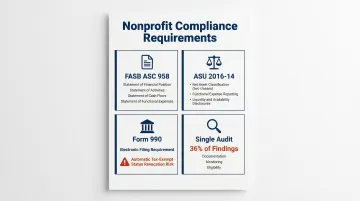
Manual processes sharply increase error risk. When finance staff assemble these reports from multiple spreadsheets, pivot tables, and exported CSVs, audit findings become inevitable.
Staffing pressure adds another layer of risk. Nonprofit finance teams are typically small, stretched across payroll, grant reporting, and operational accounting. With turnover exceeding 20% annually — and climbing above 25% for organizations with budgets under $2 million — the accounting system itself must carry operational reliability.
When your grant accountant leaves, their institutional knowledge shouldn't leave with them.
Purpose-built solutions like Sage Intacct exist because organizations managing multiple programs, government contracts, restricted donations, or separate entities (a main organization plus a foundation or regional chapters) will quickly outgrow tools designed for single-entity for-profit businesses. For most growing nonprofits, the real cost isn't the software investment — it's the audit findings, restatements, and staff burnout that accumulate while the decision gets delayed.
Core Sage Intacct Features Built for Nonprofit Organizations
Dimensions: The Engine Behind Nonprofit Visibility
Sage Intacct replaces the traditional linear chart of accounts with a multi-dimensional architecture that transforms how nonprofits track and report financial data. Instead of creating hundreds of account codes to capture every combination of program, location, grant, and fund, organizations "tag" each transaction with relevant dimensions and slice data any way they need.
The system provides:
- 10 standard dimensions (Location, Department, Customer, Vendor, Employee, Project, Warehouse, Contract, Item, Class)
- Unlimited user-defined dimensions for tracking program, fund, grant, donor type, service population, or any mission-critical attribute
- Real-time filtering and reporting across any dimension combination without restructuring your chart of accounts
Practical example: A youth development nonprofit operating in three cities with five programs funded by eight grants can track all financial activity without creating 120 separate account codes. Each transaction is tagged with city (Location), program (Department), and grant (user-defined dimension), enabling instant reporting by any combination—total spending in City A, Program B expenses across all locations, or Grant C spending by program and city.
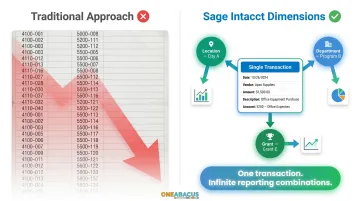
This design difference eliminates the chart-of-accounts sprawl common in general-purpose accounting software, where adding a new program or grant means creating dozens of new accounts and retraining staff on which codes to use.
Multi-Entity Management and Consolidation
Nonprofits operating multiple legal entities—a main organization plus a supporting foundation, separate 501(c)(3) entities for different programs, or regional chapters—face a monthly nightmare in generic accounting systems: closing each entity separately, exporting data, and manually consolidating in spreadsheets.
Sage Intacct's push-button consolidation eliminates this entirely:
- Each entity maintains its own books and closes independently
- Consolidation happens in real time with a single click, aggregating transactions across entities, currencies, and locations
- Intercompany eliminations are automated, not manually calculated
- Roll-up reporting provides both consolidated views and entity-level detail with drill-down to underlying transactions
These consolidation controls hold up under audit scrutiny and reduce month-end close time significantly for organizations managing two or more entities.
Real-Time Reporting and Custom KPIs
Sage Intacct includes four built-in nonprofit financial statements that generate directly from the system—no manual assembly required:
- Statement of Activities
- Statement of Financial Position
- Statement of Cash Flows
- Statement of Functional Expenses
The financial report writer lets finance teams build custom reports—grant expenditure summaries, funder-specific formats, board packages—without IT support or complex macros. Role-based dashboards then deliver the right view to each stakeholder: a program director sees budget vs. actuals for their program, a board member sees high-level KPIs with drill-down capability, and the finance team accesses full transaction-level detail for close and audit prep.
Custom KPI dashboards move beyond accounting to mission performance measurement:
- Program efficiency ratio (program expenses ÷ total expenses)
- Cost per beneficiary served
- Average donation size by campaign or donor segment
- Fundraising ROI by channel
- Days cash on hand and liquidity metrics required under ASU 2016-14
- Grant utilization rates and time-to-spend metrics
According to Sage's 2024 Nonprofit Technology Trends Survey, 46% of nonprofits now prioritize outcome metrics in their accounting software—up from 35% in 2022. For finance leaders, that means the system needs to answer not just "where did the money go?" but "what did it accomplish?"—a question Sage Intacct's KPI framework is built to answer.
Mastering Grant and Fund Management in Sage Intacct
Sage Intacct tracks the complete grant lifecycle in one system, replacing scattered spreadsheets that leads to missed billing deadlines, budget overruns, and audit findings.
Grant setup captures everything needed for compliant management:
- Grant record with funder, award amount, period of performance, and budget by line item or program
- Restriction type (time-restricted, purpose-restricted, or unrestricted)
- Revenue recognition method based on ASU 2018-08 determination (exchange vs. contribution) and ASC 606 five-step model for exchanges
- Billing schedule with automated invoicing to funders
- Required deliverables and reporting deadlines
Once the grant is configured, every expense ties directly to it. When staff charge time to a federal workforce development grant or purchase supplies for a foundation-funded literacy program, those transactions are tagged to the specific grant dimension. Real-time budget vs. actual reports show exactly how much has been spent, how much remains, and whether the organization is on track to fully utilize the award before the period of performance ends.
That expense data connects directly to net asset classification. Sage Intacct flags when restricted funds risk misuse and automates the release of restrictions when time or purpose conditions are satisfied — preventing the common audit finding where organizations inadvertently spend restricted dollars on unauthorized purposes or fail to recognize revenue when conditions are met.
Revenue recognition follows accounting standards without requiring manual judgment calls. ASU 2018-08 draws the line between exchange transactions (where the resource provider receives commensurate value) and contributions (where the primary benefit accrues to the public).
Sage Intacct enforces the appropriate treatment for each: exchange transactions follow the five-step ASC 606 model with revenue recognized as performance obligations are met, while contributions are recognized when barriers are overcome and conditions satisfied.
Dynamic Allocations handle indirect cost distribution automatically — a critical compliance requirement for federal and many foundation grants. Administrative overhead, shared facility costs, and executive salaries are spread across programs using predefined allocation bases:
- Direct costs
- Full-time equivalents (FTEs)
- Square footage
- Custom formulas
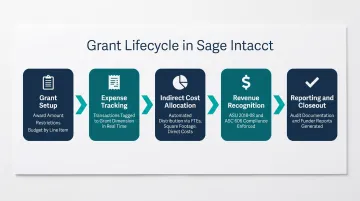
This directly addresses one of the most common single audit deficiency areas: inadequate documentation of indirect cost allocation methodology.
Compliance Reporting and Audit Readiness in Sage Intacct
Audit preparation consumes weeks of staff time in organizations using generic accounting systems. Finance teams export data, reconcile discrepancies between systems, and manually assemble supporting schedules—introducing errors that often surface as audit findings.
Sage Intacct produces all four required nonprofit financial statements natively, plus Form 990 supporting schedules, directly from the system. There's no manual assembly from multiple sources, no risk of formulas breaking, and no conflicting file versions when auditors request revisions.
Every transaction has an immutable audit trail:
- User who created, modified, or deleted the entry
- Timestamp of each action
- Before-and-after values for modified fields
- Approval history and supporting documentation
This audit trail functionality creates the defensible record auditors require, while built-in controls guard against unauthorized access and fraud. Organizations can grant auditors read-only access to the system, enabling independent verification without altering records.
Role-based access controls reinforce this structure by enforcing segregation of duties automatically:
- AP clerk can enter invoices but cannot approve payments
- Program director can view their budget but cannot modify the chart of accounts
- Board treasurer sees financial statements but cannot access employee-level detail
- CFO maintains full administrative rights with complete audit trail
62% of single audit findings involve inadequate documentation. Sage Intacct's built-in controls, approval workflows, and audit trail directly address the systemic weaknesses Federal Audit Clearinghouse data consistently flags: insufficient segregation of duties, weak documentation practices, and lack of written procedures. These are the root causes behind most compliance failures—and they're all preventable.
Getting the Most from Sage Intacct: Strategic Best Practices for Nonprofits
Many nonprofits underutilize Sage Intacct because they replicate their old chart of accounts structure inside the new system rather than redesigning it around dimensions. This is the single most common implementation mistake, and it limits reporting flexibility for years afterward.
The most common mistake is treating dimensions as optional metadata rather than the core organizing principle of the general ledger. Organizations that convert their 500-line QuickBooks chart of accounts directly into 500 Sage Intacct accounts gain little beyond moving to the cloud.
They're still manually filtering reports, still struggling to answer "How much did we spend on Program A in Location B funded by Grant C?" — and still maintaining the complex account code structure that caused problems in the first place.
Avoiding this requires rethinking classification before go-live:
- Map dimensions to how the board and funders conceptualize the organization (programs, locations, funding sources) rather than how the accounting team currently categorizes expenses
- Simplify the chart of accounts to natural expense categories (salaries, benefits, supplies, travel) and use dimensions to capture program, fund, and grant attribution
- Configure user-defined dimensions for mission-critical tracking needs (grant, fund, donor type, beneficiary population, fiscal year)
- Design reporting packages that answer board and funder questions directly, not reports that require additional manipulation in Excel
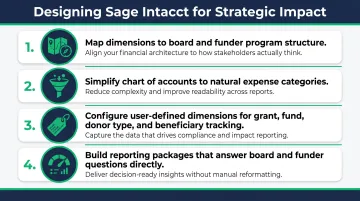
Organizations that implement this dimensional structure from day one can answer questions like "What's our cost per beneficiary for youth services in the southeast region funded by government grants?" in seconds—not days of spreadsheet work.
That outcome depends on more than technical setup. A technical implementation — migrating data, configuring modules, training users — gets the system running. A strategic implementation aligns system design with organizational structure, builds decision-ready dashboards, and automates compliance workflows. The distinction determines whether Sage Intacct becomes a compliance tool or a genuine strategic asset.
One Abacus Advisory has helped nonprofit organizations including San Diego Food Bank and Laguna Playhouse build stronger financial foundations through fractional financial leadership that bridges mission context and system capability — improving reporting, strengthening compliance workflows, and ensuring financial data supports real decisions.
Frequently Asked Questions
What is the best accounting software for nonprofits?
It depends on organizational complexity. Very small nonprofits with simple revenue streams and no grant restrictions can start with QuickBooks. But organizations managing multiple grants, restricted funds, or separate legal entities will get far more out of Sage Intacct's purpose-built fund accounting, dimensional reporting, and compliance automation.
How much does Sage Intacct cost per year?
Pricing is customized based on modules selected, number of users, and entities managed. Licensing typically runs $9,000–$35,000 per year, with implementation costs varying separately based on scope and complexity.
What is fund accounting and why do nonprofits need it?
Fund accounting treats each revenue source as a separate accountability unit with its own restrictions and reporting obligations. This ensures restricted donations and grants are spent only as donors and funders intended, a legal and ethical obligation that generic accounting software cannot enforce without extensive manual workarounds.
How does Sage Intacct handle grant management?
Sage Intacct tracks grants from initial setup through final closeout in one system. It links expenses directly to specific grants, automates billing and revenue recognition, enforces restriction compliance, and generates the funder reports and audit documentation required throughout the grant lifecycle.
Is Sage Intacct suitable for small nonprofits?
Sage Intacct is best suited for small-to-mid-sized nonprofits with grant funding, multiple programs, or multi-entity structures. Organizations with budgets under $500,000 and no restricted funding may find QuickBooks sufficient for now, but most outgrow it as complexity increases.
How does Sage Intacct compare to QuickBooks for nonprofits?
QuickBooks lacks true fund accounting, grant lifecycle management, automated indirect cost allocation, and nonprofit-specific compliance reporting—capabilities that are native to Sage Intacct. Organizations subject to single audit requirements or managing multiple restricted funding sources will quickly outgrow QuickBooks' capabilities.