Introduction
Nonprofit finance teams face mounting pressure to deliver real-time financial clarity to executive directors, program managers, and boards—yet many remain stuck in a cycle of manually compiling spreadsheets that are outdated before they're shared. According to a 2021 Sage Intacct survey of over 500 nonprofit finance leaders, 29% cited lack of real-time visibility into nonprofit KPIs as a major barrier to strategic planning.
This guide covers everything your team needs to know about Sage Intacct nonprofit financial dashboards: what they are, which pre-built types exist, which KPIs matter most, and how to configure them for meaningful reporting.
Whether you're preparing for an audit, managing restricted funds across multiple grants, or trying to give your board more than static PDFs, getting the most out of Sage Intacct's dashboard tools puts accurate, actionable data in the right hands—when it matters.
Key Takeaways
- Sage Intacct includes 10 purpose-built dashboards for nonprofits: 4 NFP-specific dashboards covering compliance, cash flow, and disclosures, plus 6 role-based views
- Dashboards pull live data from Intacct's "dimensions" system, which tags every transaction by program, fund, grant, or location—enabling instant multi-layered reporting
- Key KPIs to track: program expense ratio, operating reserve months, grant utilization rate, and fundraising efficiency—each with established nonprofit benchmarks
- Setup success depends on the Nonprofit QuickStart template and careful dimension design—misconfigured dimensions are the most common reason dashboards underdeliver
What Are Sage Intacct Nonprofit Financial Dashboards?
Sage Intacct dashboards are real-time, role-configurable data visualization tools built directly into the platform. Unlike traditional accounting systems that require end-of-month processing before reports update, Sage Intacct dashboards pull live general ledger data, eliminating the export-then-format cycle entirely.
That means your CFO, program managers, and board members can view the current financial position at any moment, without waiting for month-end close.
The Dimensions Foundation
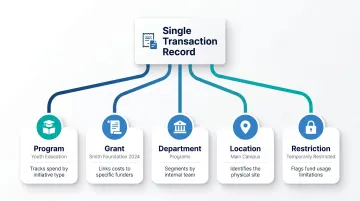
The power behind these dashboards lies in Sage Intacct's multi-dimensional chart of accounts. Every transaction can be tagged with attributes like program, grant, department, location, and funding source—without creating new account codes for every combination. As Sage explains in their official documentation, this dimensional tagging lets nonprofits "slice and dice data instantly" and aggregate by any combination of dimensions.
For example, a single expense transaction for staff salaries might be tagged simultaneously as:
- Program: Youth Education
- Grant: Smith Foundation 2024
- Department: Programs
- Location: Main Campus
- Restriction: Temporarily Restricted
Dashboards then filter and aggregate across these dimensions, making it possible to see organization-wide results and drill into a single program's grant utilization simultaneously.
Out-of-the-Box vs. Custom Dashboards
Sage Intacct provides pre-built nonprofit dashboards through the Nonprofit QuickStart template, ready to install from the dashboard library with minimal configuration. These templates work for most small to mid-sized nonprofits (annual budgets under $10 million) and can be customized as needed.
Larger or more complex organizations typically need fully custom dashboards. Here's how the two approaches differ:
- QuickStart templates: Best for nonprofits under $10M with straightforward grant and program structures; minimal setup required
- Custom dashboards: Built for organizations managing 20+ grants, multiple entities, or sophisticated fund accounting where template assumptions don't hold
The right fit depends on your reporting complexity and how well your dimension structure aligns with those templates.
The 10 Pre-Built Nonprofit Dashboards in Sage Intacct
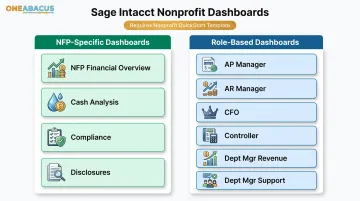
Sage Intacct provides a comprehensive library of pre-built dashboards specifically for nonprofits using the Nonprofit QuickStart template. According to official Sage Intacct documentation, the platform includes 4 NFP-specific dashboards and 6 role-based dashboards—10 total. All require the QuickStart template to install correctly.
Nonprofit Financial Overview (NFP) Dashboard
This serves as the command-center dashboard: an at-a-glance view of core financial health indicators including current cash position, net assets by restriction class, budget vs. actual summary, and recent transaction activity. It's typically the default view for CFOs and controllers, providing the essential metrics needed for daily oversight without the noise of granular transaction detail.
Cash Analysis Dashboard
This dashboard displays cash flows and trends over time, supporting both direct and indirect cash flow views. For nonprofits operating on thin reserves, early visibility into cash problems is critical. The Nonprofit Finance Fund's 2025 survey found that 52% of nonprofits have 3 months or less of cash on hand, and 18% have just 1 month or less—making real-time cash monitoring essential for sustainability.
Compliance Dashboard
This is the FASB-focused dashboard, bringing together all required financial statements in one place:
- Statement of Financial Position
- Statement of Activities
- Statement of Functional Expenses
- Statement of Cash Flow (both direct and indirect methods)
- Form 990 reporting worksheets
Centralizing these FASB-formatted statements cuts audit prep time and eliminates the manual reformatting that typically consumes staff hours before each reporting cycle.
Disclosures Dashboard
FASB ASC 958 (specifically ASU 2016-14) requires nonprofits to provide both quantitative financial data and qualitative narrative disclosures. The Disclosures Dashboard provides a centralized place for both, helping organizations explain liquidity management, donor restrictions, and functional expense allocation methods—giving auditors and board members the context they need to interpret the financials accurately.
Role-Based Dashboards
Sage Intacct includes six pre-configured role-based dashboards:
- AP Manager: Relevant reports, tasks, and graphs for accounts payable
- AR Manager: Accounts receivable metrics and workflows
- CFO: Strategic financial oversight and key performance indicators
- Controller: Day-to-day financial operations and close management
- Dept Mgr - Revenue: Revenue department performance and pipeline
- Dept Mgr - Support: Support department expenses and resource allocation
Each presents only the data and tasks relevant to that role, reducing information overload and supporting proper permission controls. This role-scoping also reinforces internal controls—staff access financial data appropriate to their responsibilities, nothing more.
Key Financial KPIs Nonprofits Should Track on Their Dashboards
Sage Intacct allows nonprofits to surface any KPI on any dashboard—but choosing the right ones is critical. Too few metrics leave leaders without direction; too many create noise that buries what actually needs attention.
Start with these five categories as your foundation.
Program Efficiency and Impact Metrics
The Program Expense Ratio (program expenses ÷ total expenses) is the most fundamental nonprofit KPI. It shows what share of total spending goes directly to mission delivery. The BBB Wise Giving Alliance Standard 8 requires at least 65% of total expenses on program activities.
Sage Intacct's statistical accounts can also track non-financial outcomes—meals served, patients treated, job placements—enabling a true program impact dashboard that connects financial inputs to mission outputs.
Reserve and Liquidity Metrics
Months of Operating Reserves (liquid unrestricted net assets ÷ monthly operating expenses) is a critical board-level metric. The National Council of Nonprofits recommends 3 to 6 months of operating reserves when possible, though NFF data shows most nonprofits fall short of this benchmark.
The Cash Analysis Dashboard can be configured to display this metric in real time, giving boards immediate visibility into the organization's financial cushion.
Grant Utilization and Restricted Fund Tracking
Grant Utilization Rate (expenses charged to grant ÷ total grant award) affects both compliance and grant renewals. Underspending signals poor execution; overspending risks audit findings and repayment.
Sage Intacct's dimension-based grant tracking keeps restricted and unrestricted funds properly separated in dashboard views. Each grant becomes its own dimension value, giving you instant visibility into:
- Spending status against the award
- Remaining balance at any point in the grant period
- Compliance with specific grant terms and restrictions
Fundraising Efficiency Metrics
The Fundraising Efficiency Ratio (fundraising expenses ÷ total funds raised) and Cost Per Dollar Raised populate automatically once transactions are tagged correctly by dimension. The BBB Wise Giving Alliance Standard 9 states nonprofits should spend no more than 35% of related contributions on fundraising—meaning no more than $0.35 to raise $1.00.
Budget vs. Actual Variance
Real-time budget vs. actual views in Sage Intacct dashboards include visual indicators (red/green flags) that immediately surface overspending at the program or department level. This gives finance teams a chance to course-correct before the period closes.
Catching overruns mid-cycle—rather than during reconciliation—is one of the most practical advantages of a well-configured dashboard.
How to Set Up and Customize Your Nonprofit Dashboards
Effective dashboard configuration starts well before touching the dashboard interface—it begins with clean dimension architecture. The most common mistake: nonprofits that set up dimensions as an afterthought end up with dashboards that can't slice data meaningfully.
Step 1: Confirm the Nonprofit QuickStart Template
Admin users can verify the template by checking the Accounting tab in Company Information. Non-admin users can verify by looking for "Net assets" as a GL account category (rather than "Equity").
If your organization isn't on the Nonprofit QuickStart template, contact your Sage Intacct account manager. Without this template, the pre-built nonprofit dashboards won't install correctly, and your chart of accounts won't align with FASB requirements.
Step 2: Design Your Dimension Structure
Dimensions are the backbone of dashboard reporting. Most nonprofits configure at minimum:
- Program (Youth Services, Senior Programs, Community Outreach)
- Fund/Grant (Smith Foundation Grant, General Operating, Capital Campaign)
- Department (Programs, Development, Administration)
- Location (Main Office, Satellite Location A, Virtual)
Your dimension design should map directly to how you report to funders and the board. Avoid creating too many overlapping dimensions—this creates reporting complexity without adding clarity.
Step 3: Install and Configure Dashboards from the Library
Navigate to Dashboards > All > Dashboards > Create from catalog > Find dashboard > Install.
Key post-install steps:
- Refresh your browser or re-login to see new dashboards
- Update dashboard permissions to restrict access by role
- Add a date filter to each dashboard page
- Consider adding dimension filters for entity or program views
- Customize KPI thresholds and visual indicators
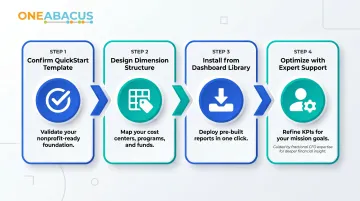
Step 4: Optimize with Expert Support When Needed
Steps 1–3 are straightforward for most organizations. Where things get complicated is multi-entity structures, large grant portfolios, and restricted fund reporting—configurations where a wrong dimension decision early on cascades into months of reporting workarounds.
Fractional CFO services—like those offered by One Abacus Advisory—help nonprofit finance teams design dimension architecture and dashboard setups that directly reflect how leadership and boards need to see the numbers. Rather than hiring a full-time senior finance executive, nonprofits get targeted guidance on the specific configuration decisions that matter: dimension structure, KPI thresholds, and access permissions by role.
Using Dashboards for Board Reporting and Stakeholder Transparency
According to BoardSource's Leading with Intent 2021 report, 98% of nonprofit boards formally approve the annual operating budget — yet effective oversight depends on timely, understandable data, not just approval authority.
Sage Intacct addresses this through the "Nonprofit Digital Board Book" — a curated dashboard view with best-practice metrics designed specifically for board consumption.
The Digital Board Book combines financial health scores, program performance, and forward-looking indicators in a single view, replacing manually assembled PDF board packets with live, drill-down-enabled dashboards.
Role-Based Permissions for Board Access
Finance teams can configure board-facing dashboards that show strategic summary data without exposing granular transaction-level detail. This maintains appropriate data governance while giving board members genuine real-time visibility into organizational health.
For example, board members might see:
- Net asset composition and trends
- Program expense ratios by major program
- Grant utilization status (on track, at risk, behind)
- Cash position and months of reserves
- Budget vs. actual variance at the department level
But they wouldn't see individual vendor payments, employee salaries, or donor-specific contribution details.
The Disclosures Dashboard: Adding Narrative to the Numbers
The Disclosures Dashboard enables nonprofits to attach qualitative context directly alongside financial figures — a practice now standard under FASB ASC 958 and valued by major donors.
Translating dashboard outputs into board-ready narratives is where financial leadership earns its value. One Abacus Advisory works with nonprofits — including organizations like San Diego Food Bank and Philadelphia Zoo — to turn these dashboards into presentations that drive strategic decisions. That means giving boards the context behind the numbers:
- Why reserves decreased (planned capital investment vs. operational shortfall)
- What's driving program expense variance (new initiative vs. cost overruns)
- How grant utilization ties back to programmatic outcomes
Frequently Asked Questions
What dashboards come built into Sage Intacct for nonprofits?
Sage Intacct provides 10 pre-built dashboards for nonprofits using the Nonprofit QuickStart template: 4 NFP-specific dashboards (NFP Financial Overview, Cash Analysis, Compliance, and Disclosures) plus 6 role-based dashboards (AP Manager, AR Manager, CFO, Controller, Revenue Department Manager, and Support Department Manager).
How do I install the nonprofit dashboards in Sage Intacct?
Go to Dashboards > All > Dashboards > Create from catalog, find the dashboard you want, and click Install. After refreshing your browser, set role-based permissions and add date and dimension filters to tailor the view for your organization.
Can Sage Intacct dashboards help with Form 990 and FASB ASC 958 compliance?
Yes. The Compliance Dashboard surfaces all required FASB-formatted financial statements (Statement of Financial Position, Statement of Activities, Statement of Functional Expenses, and Statement of Cash Flows) plus Form 990 reporting worksheets. The Disclosures Dashboard supports the qualitative narrative requirements of FASB ASC 958.
What KPIs should a nonprofit track on its Sage Intacct financial dashboard?
The most important nonprofit KPIs to track include:
- Program Expense Ratio — minimum 65% per BBB standards
- Months of Operating Reserves — 3–6 months recommended
- Grant Utilization Rate — actual expenses vs. award amount
- Fundraising Efficiency Ratio — no more than 35% of contributions per BBB
- Budget vs. Actual Variance — with real-time alerts enabled
How do role-based dashboards work in Sage Intacct for nonprofits?
Finance administrators configure separate dashboards for roles such as CFO, Controller, AP Manager, and department managers. Each dashboard shows only the metrics and tasks relevant to that role, with permissions controlling data visibility — reducing information overload and maintaining appropriate separation of duties.
Do I need technical expertise to set up Sage Intacct nonprofit dashboards?
Pre-built dashboards can be installed with minimal technical skill, but organizations with complex grant portfolios or multi-entity structures benefit from working with a Sage-experienced consultant or fractional CFO to configure dimensions and reporting correctly from the start. When dimensions are structured correctly from day one, every dashboard — from grant tracking to functional expense allocation — reflects your actual financial picture.