Introduction
Most nonprofits hit a point where spreadsheets and entry-level accounting tools can no longer support the complexity of their operations. Yet selecting the wrong ERP system can prove just as costly as operating without one—leading to fund compliance failures, grant reporting delays, and heightened audit risk. According to the Nonprofit Finance Fund's 2025 survey, 36% of nonprofits ended 2024 with an operating deficit, the highest rate in a decade, while 52% maintain three months or less of cash reserves. Financial instability of this magnitude demands systems that support precision, not workarounds.
The challenge extends beyond technology selection. Nonprofit ERP evaluation differs from commercial software selection in a critical way: applying for-profit criteria to a mission-driven context produces misalignment from the start. This guide covers the key distinctions, leading platforms for mid-market organizations, and the six factors that should drive your decision.
Key Takeaways
- Nonprofit ERPs must natively support fund accounting, grant management, and compliance reporting—features most commercial platforms lack out of the box
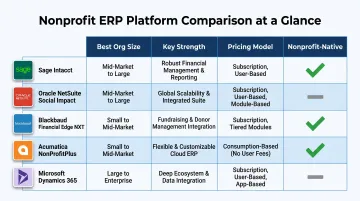
- Leading platforms include Sage Intacct, Oracle NetSuite Social Impact, Blackbaud Financial Edge NXT, Acumatica, and Microsoft Dynamics 365, each suited to different organizational profiles
- Selection requires evaluating nonprofit-specific functionality, donor system integration, total cost of ownership, scalability, implementation support, and internal capacity
- Ongoing optimization and dedicated financial leadership determine whether your ERP drives strategy—or just handles compliance
What Is a Nonprofit ERP System?
A nonprofit ERP is an integrated software platform connecting financial management, grant tracking, program operations, HR, and compliance reporting into a unified system—built around fund stewardship rather than profit generation. Unlike commercial platforms that measure profitability by tracking revenue against expenses, nonprofit ERPs track funds against donor restrictions, legal obligations, and program outcomes.
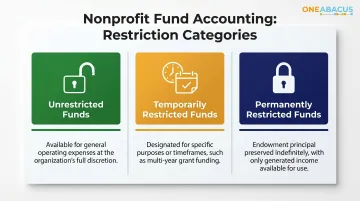
Fund accounting drives this distinction — a specialized framework most generic business tools cannot deliver out of the box. Every dollar received must be tracked according to its restriction status:
- Unrestricted — funds available for general operating use
- Temporarily restricted — tied to specific purposes or timeframes, such as multi-year program grants
- Permanently restricted — endowments that preserve principal indefinitely
Commercial ERPs using department or cost-center logic cannot enforce these legal boundaries without extensive customization.
Nonprofit ERPs vary significantly in scope: from purpose-built nonprofit accounting platforms like Blackbaud to full-suite cloud ERPs with nonprofit modules like NetSuite and Dynamics 365. The right category depends on organizational size, operational complexity, and funding mix.
Why Nonprofit Accounting Requires a Specialized ERP
Fund Accounting Is the Core Differentiator
Fund accounting forms the foundation of nonprofit financial management. According to Momentive Software, Community Action Agency of Butte County managed a $7.5 million budget across nearly 30 funding sources—a level of complexity that caused their CFO to warn, "We could easily do things with our funds and grants that are flat-out wrong and never know it, which could get us into a lot of trouble."
Generic accounting systems lack the structural capacity to track restrictions at the transaction level, creating audit vulnerability through manual workarounds.
Federal Grant Compliance Is Non-Negotiable
Organizations receiving federal funds face rigorous compliance requirements. Research shows that 68% of nonprofits receive government funding, with the sector collectively receiving $240.7 billion in government grants. Federal grants governed by Uniform Guidance (2 CFR 200) require:
- Tracking allowable costs and indirect rate application
- Personnel effort reporting
- Cost-sharing documentation
- Single Audit preparation for organizations expending over $1 million annually
The revised Uniform Guidance effective October 2024 increased the de minimis indirect rate from 10% to 15% — systems must be built to absorb regulatory changes like this without requiring manual reconfiguration every budget cycle.
Form 990 and Functional Expense Reporting
A properly configured nonprofit ERP should generate the underlying data for most Form 990 schedules natively, reducing preparation from weeks of manual compilation to days of review. FASB ASU 2016-14, effective for fiscal years after December 15, 2017, requires all nonprofits to report expenses by both nature (salaries, rent, depreciation) and function (program services, management, fundraising).
This dual-dimensional reporting must be supported at the system level through automated allocation engines—not through year-end journal entry adjustments.
Multi-Entity and Limited IT Resources
Nonprofits managing multiple chapters, affiliates, or programs need unified visibility with proper financial separation.
Most nonprofit finance teams are lean — typically a controller and one or two staff accountants running the ERP alongside daily operations. That reality shapes what "functional" actually means:
- Cloud deployment that eliminates internal server management
- Intuitive configuration staff can maintain without a dedicated IT team
- Nonprofit-aware vendor support that understands fund structures, not just software tickets
Top ERP Platforms Used by Nonprofits
The right ERP depends heavily on organizational size, funding model, and growth trajectory—not brand recognition alone. Here's a practical snapshot of the most widely used platforms.
Sage Intacct
Sage Intacct dominates the nonprofit mid-market as the only AICPA-preferred financial management solution. Key strengths include:
- Multi-dimensional reporting (fund, grant, program, location)
- Native nonprofit functionality without heavy customization
- Strong financial management without massive IT footprint
- Best suited for organizations with $2M–$200M in revenue
According to Cargas's 2026 pricing analysis, annual subscriptions start at $12,000 with average customer spend between $25,000 and $35,000 annually.
Oracle NetSuite (Social Impact)
NetSuite offers a full-suite cloud ERP through its Social Impact program, which has supported 2,800+ nonprofits in 70+ countries since 2007. The platform provides:
- Product donations and discounts for qualifying organizations
- Strong fit for nonprofits with significant earned revenue
- Multi-entity consolidation capabilities
- International scalability
One Abacus Advisory has worked directly with NetSuite in nonprofit settings—including a full optimization engagement with the Philadelphia Zoo—which informs the guidance we offer clients navigating complex implementations.
Blackbaud Financial Edge NXT
Purpose-built for nonprofit fund accounting, Blackbaud integrates natively with Raiser's Edge NXT for fundraising. Best suited for:
- Traditional nonprofits (human services, arts, community organizations)
- Organizations primarily funded by donations and grants
- Those requiring minimal earned revenue complexity
- Seamless donor-to-ledger data flow
Acumatica & Microsoft Dynamics 365
Acumatica offers flexible licensing with unlimited users within pricing tiers, making it cost-effective for mid-size nonprofits seeking full ERP functionality. The NonProfitPlus solution available through the Acumatica Marketplace adds fund accounting, grant tracking, and donor management on top of the core platform. It works best for:
- Mid-size nonprofits outgrowing entry-level accounting tools
- Organizations that need full ERP without per-user cost constraints
- Teams comfortable managing a more customizable system
Microsoft Dynamics 365 with the Nonprofit Accelerator is a strong fit for organizations already embedded in the Microsoft ecosystem. Through the Microsoft Nonprofit Program, qualifying 501(c)(3) organizations receive:
- Dynamics 365 Business Central at $32/user/month (nonprofit discount)
- Microsoft 365 Business Basic free for up to 300 users
- $2,000 annual Azure cloud credits
How to Choose the Right ERP for Your Nonprofit
ERP selection is as much a financial and operational strategy decision as a technology one. The following factors connect technical capabilities to mission-critical outcomes for nonprofits.
Factor 1: Assess Your Nonprofit's Operational Complexity
The number of active grants, restricted funds, entities, and programs determines which ERP tier is appropriate. A nonprofit managing five funds at one location has fundamentally different needs than one managing 40 grants across three affiliates.
Organizations still relying on QuickBooks should evaluate whether workarounds using classes or departments are masking structural problems. As Momentive Software notes, most nonprofits "still handle their budget in spreadsheets" because QuickBooks' budgeting capabilities cannot accommodate multiple funding sources or track restrictions natively.
Factor 2: Verify Native Fund Accounting Capability
"Fund accounting support" appears in many vendor claims but is fulfilled by few. Require vendors to demonstrate—in a live scenario—how restricted funds are tracked, how restriction releases are recorded, and how fund balances appear in GAAP-compliant financial statements.
Avoid systems that simulate fund accounting through workarounds. These approaches create compliance risk and reporting burden rather than reducing it.
Factor 3: Evaluate Grant and Compliance Reporting Depth
Grant management functionality varies dramatically across platforms. Some systems track grant budgets; others support:
- Uniform Guidance compliance and indirect cost rate application
- Single Audit requirements for organizations expending over $1 million in federal funds
- Funder-specific report generation
- Form 990 reporting readiness with functional expense allocation
Ask vendors to demonstrate compliance reporting capabilities using scenarios specific to your funding mix.
Factor 4: Confirm Integration with Donor Management and Existing Systems
The ERP must connect with your donor CRM to ensure gift data, fund designations, and acknowledgment letters stay accurate. Common platforms include Salesforce Nonprofit Cloud, Raiser's Edge, and Bloomerang.
Pre-built integrations reduce implementation risk and eliminate manual reconciliation. Require vendors to demonstrate integration live with your current or planned CRM before committing.
Factor 5: Understand Total Cost of Ownership
ERP cost extends well beyond the license fee. Budget for:
- Implementation services and data migration
- Integrations with existing systems
- User training (initial and ongoing for staff turnover)
- Support and maintenance
- Internal staff time during implementation
Approximate Cost Ranges by Revenue Tier:
- Small nonprofits (under $5M): $15,000–$50,000 total first-year cost
- Mid-size nonprofits ($5M–$50M): $50,000–$150,000 total first-year cost
- Large nonprofits ($50M+): $150,000–$500,000+ total first-year cost
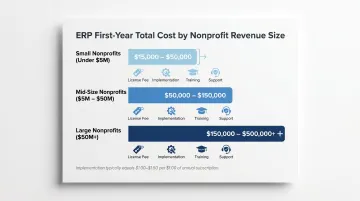
Implementation costs typically equal $1.00 to $1.50 for every $1.00 of annual subscription. Most major vendors offer nonprofit pricing discounts—always request nonprofit-specific pricing during evaluation.
Factor 6: Plan for Implementation and Ongoing Optimization
ERP implementation typically spans 3–9 months for mid-size nonprofits, with Sage Intacct averaging 90 days. Going live is not the finish line—systems require ongoing optimization as organizations grow, add programs, or take on new grant requirements.
Under-investing in post-go-live support creates real risk. A poorly configured ERP can generate more reporting burden than the manual processes it replaced. Build annual system reviews into your operating calendar — ideally timed after your audit closes, when reporting gaps are freshest and configuration changes have the most impact.
How One Abacus Advisory Can Help
One Abacus Advisory is a fractional CFO and nonprofit financial advisory firm with over 25 years of experience, specializing in the nonprofit sector for nine years. Their work with organizations like the Philadelphia Zoo, San Diego Food Bank, and Laguna Playhouse goes beyond ERP selection — they ensure the system is configured and used as a genuine strategic asset.
Their specific value in ERP engagements is financial leadership: translating an organization's reporting requirements into proper system configuration. That's work a technology vendor alone cannot deliver. Their NetSuite optimization expertise also means they can assess whether a current system is being used to its potential — not just help select a new one.
Key Ways One Abacus Advisory Supports Nonprofits:
- ERP readiness assessment aligned with fund and grant structure
- Requirements documentation that connects operations to technical specs
- Vendor evaluation support using mission-aligned criteria
- Implementation oversight ensuring configuration matches organizational needs
- Post-go-live financial reporting optimization
Each engagement is scoped to fit where the organization actually is — whether that's preparing for a first ERP or getting more out of a system already in place.
Conclusion
ERP selection is one of the highest-leverage decisions a growing nonprofit can make. But it only pays off when the system chosen aligns with the organization's actual fund structure, compliance obligations, and operational capacity—not just a checklist of aspirational features.
Before you finalize your decision, revisit these core criteria:
- Match the system to your fund accounting complexity, not your growth ambitions
- Confirm grant tracking and compliance reporting are native features, not add-ons
- Validate total cost of ownership, including implementation, training, and support
- Plan for periodic reviews as programs scale and reporting requirements shift
Choosing an ERP is not a one-time act. As programs evolve and grants multiply, the system needs to evolve too. Organizations that pair strong technology with ongoing financial leadership are the ones that turn their ERP from a compliance tool into a mission accelerator. If your team needs that financial leadership, a fractional CFO with nonprofit ERP experience—like the advisors at One Abacus Advisory—can help you make the most of whichever platform you choose.
Frequently Asked Questions
What are the main features of an ERP system for nonprofits?
Nonprofit ERPs require capabilities that standard commercial platforms don't provide:
- Fund accounting — tracks restricted vs. unrestricted funds separately
- Grant management — supports compliance reporting, Form 990, and functional expense allocation
- Multi-entity consolidation — manages financials across programs or subsidiaries
- Donor system integration — connects financial data with constituent management tools
How much does an ERP consultant cost?
ERP consultant costs vary by scope and engagement type. Implementation consultants typically charge $150 to $350 per hour, or use project-based fees ranging from $25,000 to $150,000+ depending on complexity.
How much does a nonprofit consultant cost?
Nonprofit financial consultants, including fractional CFOs, typically work on retainer or project-based models. Monthly fractional CFO retainers generally range from $3,000 to $7,500, depending on scope, organization size, and expertise level. For ERP engagements specifically, nonprofit-specialized advisors will understand fund accounting requirements and compliance nuances that generalist consultants often miss.
Is Microsoft 365 available for nonprofits?
Yes, Microsoft offers significant nonprofit pricing through the Microsoft Nonprofit Program. Qualifying 501(c)(3) organizations receive Microsoft 365 Business Basic free for up to 300 users, Business Premium at $5.50/user/month, and Dynamics 365 Business Central at $32/user/month. Validation is administered through TechSoup.
Is AWS free for nonprofits?
AWS is not universally free for nonprofits, but the AWS Nonprofit Credit Program provides up to $5,000 in promotional credits annually for eligible organizations. While relevant for nonprofits evaluating self-hosted deployments, most modern nonprofit ERPs are delivered as cloud SaaS and don't require organizations to manage their own AWS infrastructure.