Introduction
In September 2024, Intuit stopped selling new QuickBooks Desktop licenses—including the Premier Nonprofit Edition. For the thousands of nonprofits still running Desktop, this isn't a software inconvenience. It's a decision point that directly affects compliance, board reporting, and donor accountability.
Unlike small businesses tracking profit and loss, nonprofits face a distinct set of accounting demands:
- Tracking restricted versus unrestricted funds separately
- Managing multi-year grants with different reporting deadlines
- Preparing functional expense allocations for Form 990
- Maintaining audit-ready records for board treasurers and donors
Choosing the wrong platform can lead to audit failures, donor mistrust, and operational gaps that no spreadsheet workaround can fix.
This guide covers the key differences between QuickBooks Online and Desktop, nonprofit-specific strengths and limitations of each, and a practical framework for choosing what's right based on your organization's size, fund complexity, and growth trajectory.
Key Takeaways
- QuickBooks Desktop's nonprofit edition was discontinued in September 2024; new licenses are no longer available
- QBO offers cloud access, 750+ integrations, and automatic updates, making it practical for remote teams and donor management tools
- Desktop had stronger reporting and restricted fund workflows, but unsupported software now carries real security exposure
- Neither version offers true fund accounting; both rely on "Classes" to simulate fund segregation
- Your decision depends on organizational size, fund complexity, internet reliability, and growth plans, not cost alone
QuickBooks Online vs. Desktop: Quick Comparison
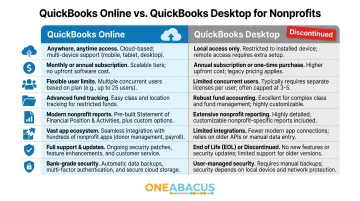
Here's how the two platforms stack up on the dimensions that matter most to nonprofits:
| Feature | QuickBooks Online | QuickBooks Desktop |
|---|---|---|
| Access | Cloud-based, any device | Local install, single workstation |
| Pricing Model | Monthly subscription ($38–$275/month) | One-time license (no longer sold) |
| User Limits | 1–25 users depending on plan | 1–5 concurrent users |
| Fund Tracking | Classes (Plus plan or higher required) | Classes with better Balance Sheet allocation |
| Nonprofit Reports | Generic reports; customization needed | Pre-built Statement of Activities, Statement of Financial Position |
| Integrations | 750+ apps (donor CRM, payroll, grants) | Limited third-party integrations |
| Support Status | Actively supported with updates | Discontinued; no updates or support for new users |
| Security | Automatic updates and patches | No security updates for unsupported versions |
Critical Nonprofit Differentiators
Class Tracking Availability:
Both platforms use "Classes" to simulate fund accounting, but QBO requires the Plus plan ($115/month) or Advanced plan ($275/month) to access Class tracking. Simple Start and Essentials plans do not include this feature. Simple Start and Essentials plans do not include this feature. Nonprofits that buy the wrong tier often discover this gap only after setup, at real cost in time and money.
Balance Sheet by Class Limitations in QBO:
QBO's Balance Sheet by Class report has a known issue: header accounts like bank balances and accounts receivable appear as "Unclassified," making true fund-level balance sheets difficult without manual reconciliation or spreadsheet exports. Desktop handles this better, though neither platform offers native fund accounting — both rely on workarounds.
Desktop's Pre-Built Nonprofit Reports:
Desktop Premier Nonprofit Edition included templates aligned with nonprofit terminology and reporting standards, such as Statement of Activities and Budget vs. Actual by program. For organizations with complex reporting needs, this eliminated hours of manual template configuration.
Cost Reality for Nonprofits
Eligible 501(c)(3) nonprofits can access discounted QuickBooks licensing through TechSoup. QBO Plus (1-year subscription, 5 users) is available for an $80 administrative fee — well below the $1,380 retail price. Eligibility requirements include:
- 501(c)(3) tax-exempt status
- Annual budget under $10 million
- An active anti-discrimination policy
The true cost of either platform often increases when factoring in required add-ons: donor CRM platforms, payroll services, and grant tracking tools can add $50–$200+ per month.
QuickBooks Online for Nonprofits
QuickBooks Online offers cloud-based financial management with real-time bank feeds, automatic updates, and multi-user collaboration. For nonprofits where the bookkeeper, executive director, and board treasurer need access at different times or locations, QBO eliminates the bottleneck of single-workstation software.
How Fund Tracking Works in QBO
QBO uses Classes and Locations as the primary mechanism for simulating fund accounting. Here's how it works:
- Create a Class for each fund or program (e.g., "Unrestricted," "Capital Campaign," "ABC Grant")
- Tag every transaction with the appropriate Class
- Run reports like "Profit & Loss by Class" to view fund-level income and expenses
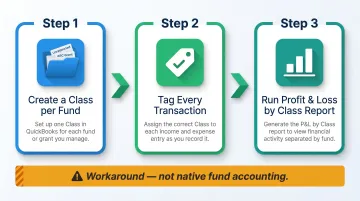
This provides fund-level visibility for income and expenses—but it's a workaround built on top of a system designed for small business accounting, not native fund accounting.
Key Nonprofit Limitations in QBO
Balance Sheet by Class Issues:
The Balance Sheet by Class report does not properly allocate header accounts. Bank balances, accounts receivable, and fixed assets show as "Unspecified," making it nearly impossible to produce accurate fund-level balance sheets without exporting to Excel for manual reconciliation.
Statement of Functional Expenses:
QBO does not natively produce the Statement of Functional Expenses required for Form 990 Part IX. Nonprofits must use workarounds like exporting data and manually categorizing expenses into program, management, and fundraising columns—a time-consuming process that introduces error risk.
No Nonprofit-Specific Chart of Accounts:
Unlike Desktop's pre-configured nonprofit chart of accounts, QBO starts with a generic small business setup. You'll need to rename "Customers" to "Donors," create appropriate revenue accounts for contributions and grants, and build expense categories aligned with functional classifications.
Integration Advantages for Nonprofits
QBO's integration ecosystem includes over 750 apps, making it possible to connect with:
- Donor management platforms: Bloomerang, Kindful, Donorbox
- Online giving tools: PayPal, Stripe, Classy
- Payroll providers: Gusto, ADP, QuickBooks Payroll
- Grant management tools: Foundant, Submittable
This connectivity reduces manual data entry and improves accuracy. That said, managing multiple subscriptions, data syncs, and API connections requires technical savvy or external support.
Nonprofit Pricing for QBO
QBO offers four subscription tiers. Here's what nonprofits actually need to know:
| Plan | Price | Class Tracking? | Best For |
|---|---|---|---|
| Simple Start | $38/month | ❌ No | Not suitable for nonprofits |
| Essentials | $75/month | ❌ No | Not suitable for nonprofits |
| Plus | $115/month | ✅ Yes | Minimum viable option for fund tracking |
| Advanced | $275/month | ✅ Yes | Complex organizations with 25+ users |
Critical Note: Fund tracking via Classes is only available in QBO Plus or Advanced. Simple Start and Essentials are insufficient for most nonprofits—this is a common and costly misunderstanding.
Eligible nonprofits can access discounted QBO Plus through TechSoup for an $80 administrative fee (1-year subscription, 5 users). That's a 94% discount off retail. Check TechSoup's eligibility requirements to confirm your organization qualifies before budgeting for a full subscription.
QuickBooks Desktop for Nonprofits: What's Still Available
Current Status of Desktop
Intuit stopped selling new Desktop licenses (including Premier Nonprofit Edition) on September 30, 2024. This includes Pro Plus, Premier Plus, and Mac Plus—but not QuickBooks Enterprise, which remains available for purchase and support.
Existing license holders can technically continue using Desktop, but they face significant limitations:
- No new licenses available for first-time users
- Support continues for active subscribers who renew
- Security updates provided for supported subscription versions
- Unsupported versions lose access to payroll tax tables, bank feeds, payment processing, and customer support
For nonprofits running unsupported Desktop versions, the risks are concrete: security vulnerabilities exposing sensitive donor and financial data, loss of payroll compliance tools, and eventual incompatibility with OS updates. These aren't distant concerns—they affect organizations today.
What Desktop Premier Nonprofit Edition Offered
When it was available, Desktop Premier Nonprofit Edition included several features built specifically for nonprofit operations:
- Pre-configured nonprofit chart of accounts with terminology aligned to nonprofit reporting standards
- Donor/member terminology instead of generic "Customer" labels
- Dedicated reports including Statement of Financial Position, Statement of Activities, and Budget vs. Actual by program
- Better restricted cash tracking within a single bank account using multiple "bank" accounts in the chart of accounts
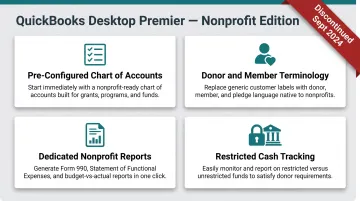
Desktop was the go-to platform for nonprofits with complex reporting needs for over a decade. Organizations could generate board-ready financial statements and audit-ready reports without extensive customization.
Beyond nonprofit-specific terminology, Desktop has historically offered more robust reporting depth than QBO:
- Better Balance Sheet by Class allocation for fund-level reporting
- Memorized reports that saved complex custom report configurations
- Advanced filtering and grouping options for budget vs. actual analysis
- Faster report generation for organizations with large transaction volumes
For nonprofits managing multiple restricted funds without separate bank accounts for each, Desktop's restricted cash tracking within a single account was a real operational advantage. QBO has narrowed this gap, but Desktop still holds an edge for legacy users who rely on highly customized report configurations.
When Desktop Still Makes Sense (Temporarily)
There are narrow scenarios where staying on Desktop short-term may be justified:
- No internet access or unreliable connectivity in rural or underserved areas
- Mid-fiscal-year with complex audit underway where switching platforms mid-stream creates more risk than benefit
- Highly customized Desktop setups with memorized reports, custom fields, and workflows that would take significant time and cost to replicate in QBO
Each of these is a reason to delay migration—not skip it. Organizations in these circumstances should set a firm migration target date and build a transition plan now, rather than drifting on unsupported software until a crisis forces the move.
QuickBooks Online vs. Desktop: Which Is Right for Your Nonprofit?
Decision Factors Nonprofits Should Weigh
Your choice between QBO and Desktop (or beyond QuickBooks entirely) depends on these core factors:
- Fund complexity: Number of restricted grants, programs, and funds
- Team location: Remote/distributed vs. single office
- Internet reliability: Consistent high-speed access vs. intermittent connectivity
- Budget: Subscription costs plus required add-ons
- Existing software ecosystem: Donor CRM, grant management, payroll tools
- Growth trajectory: Expected organizational complexity over the next 3-5 years
Clear Situational Guidance
Choose QuickBooks Online if:
- Your team works remotely or across multiple locations
- You use or plan to use donor management integrations
- You're starting fresh or renewing your accounting platform
- Long-term vendor support is a priority
- You need real-time access for multiple users simultaneously
- Your board treasurer reviews financials from home
Stick with Desktop (temporarily) only if:
- You're an existing user mid-fiscal-year with no immediate renewal pressure
- You have highly customized reporting you can't yet replicate in QBO
- You lack reliable internet access
- You have a firm migration plan with target dates within 6-12 months
The Fund Accounting Ceiling
Both QBO and Desktop hit practical limits as nonprofits grow in complexity. Once you're managing 20+ funds, multiple grants with separate reporting requirements, and functional expense allocations across programs, both platforms push you toward spreadsheet workarounds.
Common triggers for outgrowing QuickBooks include:
- No way to track true restricted net assets per fund
- Manual reconciliation needed for fund-level balance sheets
- Missing FASB/GASB compliance tools for complex reporting
- Staff time on spreadsheet workarounds exceeds the cost of purpose-built software
At this stage, organizations should evaluate purpose-built nonprofit accounting software (such as Blackbaud Financial Edge NXT, Sage Intacct for Nonprofits, or NetSuite for Nonprofits) or enterprise solutions. Finance leaders who act on these signals before the workarounds compound typically spend far less on remediation and retraining.
Transitioning from Desktop to QBO
If you're migrating from Desktop to QBO, follow these key steps:
- Reconcile and clean up accounts in Desktop — resolve discrepancies before conversion
- Use Intuit's conversion tool — transfers chart of accounts, customers, vendors, and transactions
- Set up Classes for fund tracking — create a Class for each fund or program
- Rename Customers to Donors — align terminology with nonprofit standards
- Run parallel reporting for one month — compare Desktop and QBO reports to verify accuracy before fully switching
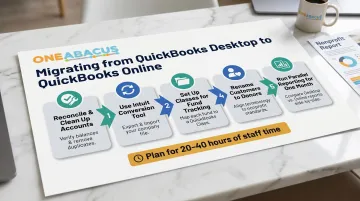
Plan for 20-40 hours of staff time for setup, testing, and training — more if your chart of accounts is complex or your team is new to QBO. If that scope feels daunting, outside guidance can compress the timeline significantly.
When to Seek Expert Guidance
Nonprofits navigating complex financial systems—whether choosing between platforms or scaling beyond QuickBooks—often benefit from fractional CFO guidance that looks at the full financial structure, not just the software. One Abacus Advisory works with nonprofits to evaluate accounting infrastructure and build reporting systems that support board transparency and grant compliance. Their work spans accounting system assessments, platform optimization across NetSuite, Sage Intacct, and QuickBooks, and hands-on financial leadership during periods of growth or transition.
Conclusion
After weighing the trade-offs, QuickBooks Online is the practical path forward for most nonprofits — Desktop's discontinuation has largely settled that debate. But the right QBO plan, setup, and integration stack varies based on your organization's complexity. The deeper question is whether QuickBooks in any form is the right long-term fit as your nonprofit grows.
The platform you choose directly affects your ability to:
- Track restricted funds accurately across multiple grants
- Produce board-ready financial reports on demand
- Pass audits without scrambling for documentation
- Maintain the donor trust your mission depends on
This is one of the highest-leverage operational decisions a finance leader can make. Getting it right — ideally with input from a fractional nonprofit CFO like those at One Abacus Advisory — ensures your accounting infrastructure scales with your mission, not against it.
Frequently Asked Questions
Can nonprofits get QuickBooks for free?
Nonprofits cannot get QuickBooks for free, but eligible 501(c)(3) organizations can access heavily discounted licensing through TechSoup. QBO Plus (1-year, 5 users) is available for an $80 administrative fee, representing a 94% discount. Eligibility requires 501(c)(3) status, annual budget under $10 million, and an anti-discrimination policy.
Is there a big difference between QuickBooks Online and QuickBooks Desktop?
Yes—the core differences are cloud vs. local access, subscription vs. one-time license pricing, and integration ecosystem size. QBO offers 750+ integrations and continuous updates; Desktop provided superior reporting but was discontinued for new purchases in September 2024, making QBO the only actively supported option.
Is QuickBooks Online good for nonprofits?
QBO is a practical choice for many small to mid-sized nonprofits, but fund tracking requires the Plus plan ($115/month) or higher. It uses Classes as a workaround rather than native fund accounting, and the Balance Sheet by Class report has limitations that require manual reconciliation for accurate fund-level financials.
What is the difference between QuickBooks and QuickBooks Nonprofit?
QuickBooks Nonprofit (Desktop Premier Nonprofit Edition) was a preconfigured Desktop version with a nonprofit chart of accounts, donor terminology, and specialized reports—now discontinued. QBO has no separate nonprofit edition; nonprofits use standard QBO plans with manual customization.
Is QuickBooks Desktop going away in 2026?
Intuit stopped selling most Desktop licenses in September 2024 and is focused entirely on QBO development. Existing subscribers can continue using their software and receive updates with an active subscription, but new licenses are no longer available.
What are the four levels of QuickBooks Online subscriptions?
The four QBO plans are Simple Start ($38/month), Essentials ($75/month), Plus ($115/month), and Advanced ($275/month). Nonprofits need at least the Plus plan to access Class tracking for fund management—Simple Start and Essentials do not include this critical feature.