Introduction
NetSuite serves over 43,000 customers globally, including more than 1,000 nonprofits that have collectively received $70,000,000 in software donations through the Oracle NetSuite Social Impact program. As a purpose-built ERP for nonprofits, NetSuite provides donation-recording capabilities designed to support GAAP compliance, donor transparency, and clean financial reporting.
Outcomes vary dramatically based on how the system is configured before the first donation is ever entered. A NetSuite instance that produces audit-ready financial statements automatically versus one that requires months of year-end reconciliation — the difference almost always traces back to GL segments, restriction classifications, and chart of accounts structure set up correctly from day one.
This guide covers the prerequisites, step-by-step recording process, donation type variations, and the configuration mistakes that create the most cleanup work down the line.
Key Takeaways
- NetSuite records donations using donor records, revenue accounts, and GL custom segments — all configured before data entry begins
- Different donation types (cash, pledges, in-kind, grants) require different workflows and cannot be entered identically
- FASB-required restriction classification must be applied at transaction level using NetSuite's Restriction segment
- Most errors stem from missing segment setup, incorrect restriction tagging, or conflating pledges with payments
- Proper upfront configuration produces audit-ready statements and eliminates months of costly reconciliation work
What You Need Before Recording Donations in NetSuite
NetSuite's donation recording process depends entirely on correct upfront configuration. Jumping into data entry without a properly structured chart of accounts, GL segments, and donor records produces unreliable financial reports.
Research shows that approximately 6% of nonprofit financial statements disclose errors — a rate 60% higher than publicly traded corporations. Many of these errors stem from internal control deficiencies and improper system setup.
Chart of Accounts and GL Custom Segments
Nonprofits should establish a streamlined chart of accounts with dedicated revenue accounts for each donation type:
- Unrestricted contributions
- Temporarily restricted contributions
- Grant revenue
- In-kind revenue
NetSuite's GL custom segments must be activated before any donation is entered, since they cannot be retroactively applied to existing transactions.
NetSuite Social Impact editions include eight custom segments:
| Custom Segment | Purpose |
|---|---|
| Restriction | Tags contributed revenue as restricted by the donor; manages release of restricted funds (required field) |
| Program | Shows which program the donation supports or expense serves |
| Grant | Tags revenue and expenses to a specific grant |
| Time Restriction | Tags grant revenue and expenses to a specific year of funding |
| Region | Tags revenue and expenses to a geographic region |
| Revenue Type | Tags revenue at a higher level (e.g., Contributions, Exchange Transactions) |
| Revenue Subtype | Tags revenue at a granular level (e.g., Corporate Donations, Individual Donations) |
| Functional Expense | Tags expenses to functional categories (Program, Management & General, Fundraising) |
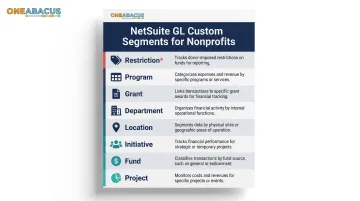
The Restriction segment is mandatory and directly affects FASB ASU 2016-14 compliance, which requires nonprofits to present net assets in two classes: with donor restrictions and without donor restrictions.
With your chart of accounts and GL segments in place, the next requirement is ensuring your donor data and user access are properly configured before any transactions are entered.
Donor Records and User Roles
Each donor must exist as a Constituent record in NetSuite before a donation can be linked to them. The person entering donations needs appropriate permissions — typically an Accountant role or custom nonprofit role — with access to:
- Create revenue transactions
- Access donation and pledge records
- Run financial reports
Compliance Readiness Check
Before recording donations, confirm your NetSuite instance includes:
- The Restriction segment configured with both "with donor restrictions" and "without donor restrictions" values in your Social Impact edition
- CRM integration field mappings validated to prevent duplicate or manual double-entry if you use a fundraising platform alongside NetSuite
Organizations like the San Diego Food Bank have worked with advisors such as One Abacus Advisory to audit their configuration before go-live, catching misconfigurations that would otherwise surface as reporting errors months later.
How to Record Donations in NetSuite Step by Step
These steps cover recording a standard cash contribution. Pledges, in-kind gifts, and grants follow the same core workflow with transaction-type adjustments addressed in the next section.
Step 1: Locate or Create the Donor Constituent Record
Navigate to the Constituents module (or Customers/Contacts depending on configuration) and search for the donor by name or ID. If the donor is new:
- Create a constituent record with name, contact details, and donor classification
- Verify proper categorization (individual vs. organization) — this affects acknowledgment letter generation and CRM reporting later in the process
Step 2: Create a New Donation Transaction
Navigate to Transactions > Donors (or the equivalent path in your configured nonprofit module) and select "Enter Donation" or "New Contribution" to open the donation entry form.
Complete these key header fields:
- Donor — linked constituent record
- Date — use actual receipt date for proper period recognition
- Donation Amount — full contribution value
Step 3: Select the Revenue Account and Apply GL Custom Segments
In the line item section of the donation form:
- Select the appropriate revenue account based on donor intent (e.g., Unrestricted Contributions or Restricted Contributions)
- Apply all required GL custom segments:
- Fund — identifies the specific fund receiving the contribution
- Program — ties the donation to a specific programmatic area for reporting
- Restriction — set to "With Donor Restrictions" or "Without Donor Restrictions" based on donor intent
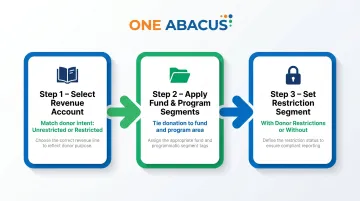
Missing segment tags will surface as fund accounting discrepancies in reports — catch them during entry, not at month-end.
Step 4: Enter Donation Purpose and Donor Intent Details
In the memo/description field, document the donor's stated purpose or restriction (e.g., "for youth literacy program, fiscal year 2025"). This text becomes part of the audit trail and supports fund-level reporting.
For restricted gifts, also confirm:
- Restriction segment is set to "With Donor Restrictions"
- Time Restriction segment is applied if the gift spans multiple fiscal years
Step 5: Save the Record and Generate the Acknowledgment Letter
Save the transaction and verify the general ledger entry was created correctly. NetSuite will auto-generate:
- Debit to Cash or Accounts Receivable
- Credit to the appropriate contribution revenue account
From this same record, trigger a donor acknowledgment letter. The IRS requires written acknowledgment for donations over $250 — your template should include:
- Donation amount
- Date
- Description of any goods or services received by the donor (or statement that none were provided)
- Nonprofit's tax ID
Recording Different Donation Types in NetSuite
Not all donations follow the same workflow. The transaction type, entry path, and GL treatment differ meaningfully depending on whether the gift is cash, a pledge, in-kind, or grant revenue. Using the wrong transaction type causes mismatches in financial statements.
Cash Donations
Immediate cash gifts are entered using a direct deposit/contribution transaction. The full amount is recognized as revenue in the period received and posted immediately to the cash or bank account.
Pledges and Pledge Payments
A pledge is a donor's commitment to give in the future. It must be recorded as a separate pledge transaction, creating a receivable on the balance sheet — not as revenue at the time of the promise.
Under FASB ASC 958-605, unconditional promises to give are recognized as revenues in the period received at fair value.
In NetSuite:
- Create a Pledge record first (creates accounts receivable)
- Later, enter a Pledge Payment transaction that closes down the receivable and records cash
Mixing up a pledge and a payment is a common NetSuite error in nonprofits — it overstates revenue in earlier periods and understates cash balances.
In-Kind Donations
In-kind donations (goods, services, free rent, professional services) must be recorded as both revenue and expense in the same or corresponding period, at fair market value.
In NetSuite, this requires a journal entry:
- Debit the relevant expense account
- Credit in-kind contribution revenue
- Both tagged with appropriate GL segments
FASB ASU 2020-07 requires in-kind donations to be disclosed as a separate line item from cash contributions. They must be mapped to a distinct in-kind revenue account, not lumped into general contributions.
Grant Revenue
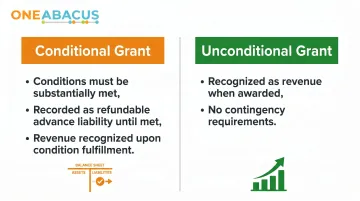
Grant revenue is recorded differently depending on whether the grant is conditional or unconditional.
FASB ASU 2018-08 clarifies:
- Conditional grants are recognized only when conditions are substantially met; until then, they sit on the balance sheet as a refundable advance liability
- Unconditional grants are recognized as revenue when awarded
NetSuite's grant management module allows nonprofits to create a grant record tied to a project, track budget vs. actuals, and record revenue recognition in alignment with grant agreement terms.
Key Parameters That Affect Accurate Donation Recording in NetSuite
Even when staff follow the correct navigation steps, accurate donation recording depends on four configuration and data-entry variables that affect financial statement quality and audit readiness.
GL Custom Segment Completeness
Every donation transaction must carry the correct Fund, Program, Grant, and Restriction segment values. These segments enable NetSuite's dimensional reporting for FASB-compliant statements — without them, transactions post to the correct account but can't be sliced by fund, program, or restriction for reporting purposes.
Missing segments require manual reclassification before period-end close and make it impossible to produce accurate Statements of Activities by fund or program.
Restriction Classification (With vs. Without Donor Restrictions)
FASB ASU 2016-14 requires nonprofits to present net assets in two classes — with and without donor restrictions. NetSuite's Restriction segment value on each transaction populates this classification in financial statements.
Incorrectly tagged restrictions overstate or understate unrestricted net assets, misrepresenting the organization's available operating funds to auditors, boards, and lenders.
Donation Date and Period Recognition
The date entered on a donation transaction determines which fiscal period the revenue posts to. For a nonprofit on a July–June fiscal year, an off-by-one-day entry can shift revenue between fiscal years and distort budget-to-actual comparisons.
The downstream effects aren't trivial:
- Restated financials at year-end
- Complications in grant reporting to funders
- Audit adjustments that consume staff time and credibility
Pledge vs. Payment Distinction
Pledges are receivables; payments are cash receipts. Treating them as the same transaction type collapses this distinction and results in either double-counted revenue or unrecognized receivables on the balance sheet.
Incorrect handling makes accounts receivable aging reports unreliable and can trigger audit findings around improper revenue recognition — two outcomes that create significant friction during an annual audit.
Common Mistakes When Recording Donations in NetSuite
Three entry errors show up repeatedly across nonprofit NetSuite environments:
- Missing GL segment tags: Staff often populate only the revenue account and leave custom segments blank. NetSuite won't block this, but fund-level reporting becomes unusable and retroactive correction is time-consuming.
- Pledges recorded as donations: When staff enter a pledge commitment as immediate revenue, income is overstated in the current period and the pledge receivable never hits the balance sheet.
- Wrong revenue account for in-kind or grant transactions: Posting in-kind gifts to the general "Contributions" account, or recognizing conditional grant revenue before conditions are met, violates GAAP and typically requires audit adjustment.
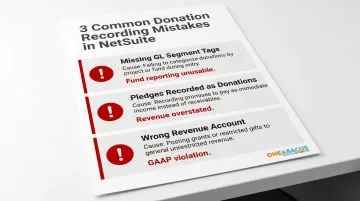
Clean account and segment setup prevents these errors at the source. One Abacus Advisory's NetSuite optimization work with clients like the San Diego Food Bank is structured around this principle — catching configuration gaps before they produce year-end cleanup problems.
Frequently Asked Questions
How do nonprofits keep track of donations?
Nonprofits track donations using a combination of their CRM (for donor relationships and giving history) and their accounting system (for financial recording and GAAP-compliant reporting). In NetSuite, these functions unify so donations recorded in the CRM flow directly to the general ledger with the correct fund and restriction tags.
How do you record a cash donation in NetSuite?
A cash donation is entered via a Contribution or Donation transaction in NetSuite and linked to the donor's constituent record. It posts to the appropriate contribution revenue account with GL custom segments for fund, program, and restriction.
What is the difference between a pledge and a donation in NetSuite?
A pledge is a future commitment entered as a receivable using NetSuite's Pledge record type, while a donation (or pledge payment) records the actual cash receipt. The two must be entered as separate transactions to correctly reflect accounts receivable and cash on financial statements.
How do you record in-kind donations in NetSuite?
In-kind donations are recorded via a journal entry that debits the applicable expense account and credits an in-kind contribution revenue account, both at fair market value with appropriate GL segment tags. This keeps them separate from cash contributions, as required under FASB standards.
What GL accounts are needed to record donations in NetSuite for nonprofits?
Nonprofits need separate revenue accounts for unrestricted contributions, restricted contributions, in-kind revenue, and grant revenue, plus receivable accounts for pledges. NetSuite's Social Impact edition includes a pre-configured nonprofit chart of accounts as a starting point.
Can NetSuite automatically generate donor acknowledgment letters?
Yes. NetSuite can auto-generate donor acknowledgment letters from contribution transactions, covering required IRS language, donation amount, date, and the organization's tax ID. Templates are set up during initial system configuration.